Spidetron: A Dynamic Template for Your Next Presentation
You know that feeling when you open a blank presentation and the cursor just blinks back at you, mocking your lack of design inspiration? We've all been there. Crafting a slide deck that is both visually compelling and communicates your message clearly is a significant undertaking. It's not just about putting text on a slide; it's about building a narrative, guiding your audience's attention, and reinforcing your brand's identity at every turn. This is where a well-structured template becomes less of a shortcut and more of a strategic foundation for your ideas.
Building a Visual Narrative with Structured Slides
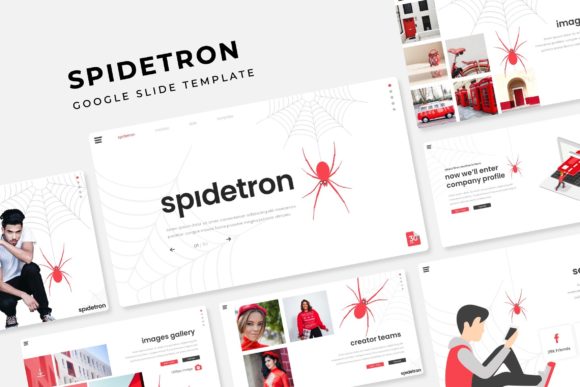
The Spidetron Google Slide Template is designed to tackle that blank-canvas problem head-on. At its core, it's a comprehensive toolkit built for modern communicators. The package includes over 150 total slides, which are intelligently organized across five premade color themes. Each of the five color variations contains 30 meticulously crafted slides, ensuring that your entire deck maintains a consistent and professional look from the title slide to the final call-to-action.
This isn't just about swapping out a background color. The design system within Spidetron ensures that every element, from text boxes to charts, adapts harmoniously to the chosen palette. For a small business owner or a marketing professional, this means you can quickly align a presentation with your existing brand colors without spending hours manually adjusting every single graphic. The result is a cohesive visual story that feels intentional and polished, which is crucial for building trust with potential clients or stakeholders.
From Infographics to Portfolios: A Slide for Every Need
A great presentation does more than display bullet points. It visualizes data, showcases work, and breaks information into digestible segments. This is where the handcrafted infographics and dedicated section break slides come into play. Instead of wrestling with complex chart tools, you can drag and drop your data into pre-designed, pixel-perfect illustrations. Whether you're presenting quarterly sales figures, outlining a project timeline, or explaining a complex process, these infographics make the information accessible and engaging.
For creatives, entrepreneurs, and agencies, the included gallery and portfolio slides are a game-changer. They provide a clean, elegant framework for displaying your best work. The picture placeholders are fully resizable and editable, allowing you to simply drag and drop your own images into place. This feature is invaluable for designers presenting mood boards, photographers showcasing a recent shoot, or consultants displaying case studies. It transforms a standard presentation into a dynamic portfolio review, all within the familiar environment of Google Slides or PowerPoint.
Practical Design for Real-World Workflows
The true value of a design asset is how it integrates into your actual workflow. The Spidetron template is built on master slides, which is the engine behind its efficiency. This means that any global change—like updating a font, adjusting a logo placement, or modifying a color accent—can be applied across all 150+ slides in just a few clicks. This system enforces visual consistency and saves an enormous amount of time during the revision process.
Furthermore, the package is delivered as five separate PPTX files (one for each color theme), making it straightforward to manage. The inclusion of a "Readme First" file and links to the free fonts used in the design ensures you can get started immediately without hunting for assets. This attention to practical details is what separates a helpful design tool from a frustrating one. It’s built for people who need to produce high-quality work efficiently, whether they're preparing for a crucial investor pitch, a client workshop, or a team training session.
Leveraging the Template for Brand and Marketing Assets
Think beyond the traditional slide deck. The structured layouts within Spidetron are a goldmine for creating a variety of marketing and brand assets. The consistent style across the 30 slides in each color theme provides a ready-made design system you can repurpose.
Consider these applications:
- Social Media Graphics: Use individual slide layouts as templates for Instagram carousels or LinkedIn infographic posts. The pre-sized elements ensure your graphics look sharp and on-brand.
- One-Page Summaries: Export a single slide as a PDF to create a professional one-pager for sales handouts, project summaries, or event flyers.
- Digital Reports & Proposals: Compile a series of slides into a cohesive digital report or client proposal. The section break slides help organize chapters and guide the reader through the document.
- Internal Training Materials: Develop clear, visually engaging training manuals or onboarding guides for new team members, maintaining a professional internal brand standard.
This versatility makes the template a valuable component of your broader brand identity toolkit. By using the same visual language across presentations, social media, and documents, you reinforce brand recognition and create a seamless experience for your audience.
Final Thoughts on Choosing Your Design Tools
Ultimately, selecting a template like Spidetron is about more than just aesthetics. It's about choosing a tool that respects your time, enhances your message, and scales with your needs. The combination of a robust slide library, intelligent color theming, and practical features like master slides and drag-and-drop placeholders addresses the real challenges faced by communicators today. It provides the structure to build upon, freeing you to focus on what truly matters: your content and your connection with the audience. Whether you're a seasoned designer or a business owner wearing many hats, having a reliable and flexible presentation template can be the difference between a good presentation and a great one.