Emplyo: Visualizing Your Team's Pulse with Clarity
Ever feel like you're navigating your company's culture with a foggy windshield? You sense the general direction—morale seems okay, teams are productive—but you can't quite see the road ahead or the potential bumps. This is where a dedicated visualization tool transforms guesswork into insight. The Emplyo Employee Engagement Dashboard is designed to cut through that fog, offering a clean, intuitive window into the real-time health of your workforce.
A Blueprint for People-Centric Design
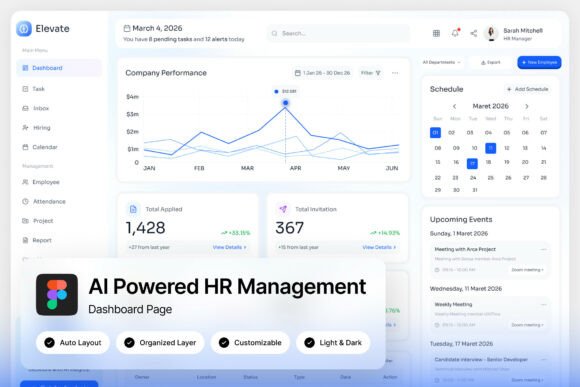
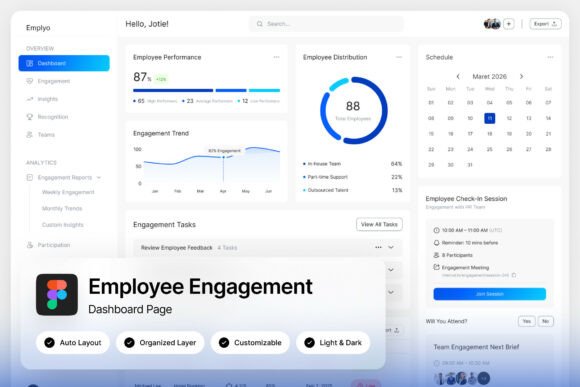
At its core, Emplyo is more than a collection of charts; it's a thoughtfully crafted UI kit that prioritizes human understanding. The light-themed, blue-and-white layout isn't just aesthetically pleasing—it's functionally brilliant. Cool blues are known to evoke trust and calm, perfect for the sensitive data surrounding employee sentiment. The ample white space prevents cognitive overload, allowing HR professionals and team leads to focus on what matters: the trends behind the numbers. Whether it's a sudden dip in satisfaction scores or a surge in team activity, the design ensures critical information is presented without noise.
For designers and product teams in the HR tech space, this asset is a masterclass in modern dashboard design. It demonstrates how to present complex datasets—like pulse survey results and headcount metrics—in a way that feels accessible and actionable. The pixel-perfect layout and well-organized layers in the Figma file make it a springboard for development, not a final product to be copied. You're getting a professional, scalable framework that speaks the language of user experience.
From Internal Metrics to External Branding
While Emplyo is built for internal analytics, its design principles are invaluable for any project requiring clear, professional communication. The same visual clarity that makes a satisfaction score easy to digest can make a product feature stand out on a website or a social media graphic pop in a crowded feed. Think about applying its clean typography and structured layout to your next set of marketing assets. The consistent use of hierarchy, color, and spacing can elevate everything from a simple email newsletter to a comprehensive annual report.
Consider the font choices embedded in the dashboard. Using free Google Fonts ensures accessibility and ease of integration for web projects. This practical approach to typography is a lesson for any brand: select typefaces that are not only stylish but also functional and widely supported. The included font links (.txt file) are a small but significant detail, removing a common hurdle for designers and developers looking to replicate or adapt the style.
Practical Applications Beyond the Dashboard
The design language of Emplyo is versatile. Its modern, professional aesthetic can be adapted to a wide range of creative and commercial projects:
- Brand Identity Systems: The clean color palette and structured layout can serve as a foundation for a brand's visual identity, ensuring consistency across digital and print touchpoints.
- Presentation & Editorial Design: Use the dashboard's data visualization style to create compelling infographics, pitch decks, or editorial layouts that need to tell a story with numbers.
- Web & App Interfaces: The UI components—cards, timelines, progress bars—are directly applicable to designing user-friendly interfaces for SaaS products, internal tools, or client portals.
- Marketing Collateral: Translate the dashboard's clarity into brochure layouts, social media templates, or digital product mockups where a professional, trustworthy tone is essential.
For a small business owner or content creator, this resource is a window into how top-tier products are designed. Studying its organization can inform how you structure your own projects, whether you're building a website, designing a course, or packaging a digital download. The emphasis on named, grouped layers is a best practice that saves countless hours during the design and handoff process.
Making the Most of Your Design Assets
When you download a resource like Emplyo, you're not just getting a static image. The included Figma file (.fig) is a living document you can deconstruct. Break apart the components to understand how they were built. Experiment with the color variables. Swap out the font pairings to see how it changes the mood—perhaps a serif font for headings to add a touch of authority, or a handwritten script for a more personal feel in a different context. This kind of hands-on exploration is how you internalize good design principles.
Remember, the goal isn't to replicate the dashboard exactly. It's to absorb its philosophy: that even complex information can be presented with elegance and ease. Use it as inspiration to audit your own projects. Is your website's navigation as clear as Emplyo's menu? Are your product's key metrics as immediately understandable as its satisfaction scores? By focusing on the underlying principles of visual communication, you turn a single download into a lasting improvement for all your creative work.