Why Your Social Media Banner Design Template Matters More Than You Think
You know that feeling when you land on a profile and everything just clicks? The banner image flows into the profile picture, the colors feel intentional, and the entire vibe screams professionalism before you even read a single word. That's not an accident—it's the result of thoughtful design planning, often starting with a solid foundation like a social media banner design template built to exact specifications.
Here's the reality most people overlook: your banner is prime real estate. It's the first visual handshake between you and your audience. Whether you're a freelance designer juggling client projects, a small business owner trying to build credibility online, or a content creator who wants every platform to feel cohesive, getting that banner right sets the tone for everything else.
The Anatomy of a Template That Actually Works
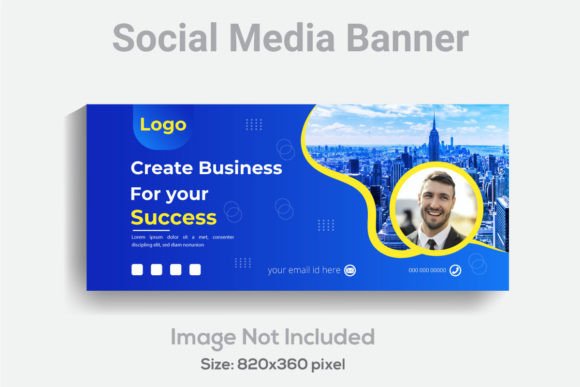
Not all templates are created equal. A properly designed social media banner at 820x360 pixels in RGB color mode with 300 DPI resolution gives you something most free downloads don't—flexibility without compromise. That resolution means your design stays crisp whether someone views it on a retina display or zooms in to check details. The RGB color space ensures accurate screen display across devices, which matters enormously when your brand colors need to look consistent from a laptop to a smartphone.
What separates a usable template from a frustrating one comes down to file organization. When every element sits on its own clearly labeled layer in Adobe Illustrator, you're not spending twenty minutes hunting for that one shape you need to recolor. You open the file, find what you need, make your changes, and move on. That's the difference between a template that saves you time and one that wastes it.
The fact that text, fonts, and colors are fully editable in the AI file means you can match any brand palette without creative workarounds. Need to swap a serif font for something more contemporary? Go ahead. Want to test how your brand's secondary color looks as the primary background? Change it in seconds. This level of editability turns a single template into dozens of unique banners.
Practical Applications Beyond Social Media
Think of this kind of template as a launchpad, not a limitation. Yes, it's designed for social media headers, but the underlying structure—a wide, horizontally oriented layout with clean layers and professional resolution—translates beautifully to other projects.
Website hero sections benefit from the same proportions. Blog headers gain instant polish. Email newsletter banners that maintain visual consistency with your social presence become effortless. Even print projects like wide-format banners or event signage can start from a template like this, adjusted for the appropriate output specifications.
For entrepreneurs building a brand from scratch, having a reliable template means you can create promotional graphics for product launches, seasonal sales, and announcements without starting from a blank canvas every time. The included JPG file works perfectly when you need a quick preview or a static image for platforms that don't support layered files.
The EPS file format adds another layer of versatility. If you're collaborating with someone who uses CorelDRAW, Affinity Designer, or another vector application, the EPS ensures compatibility without file conversion headaches. That kind of forward-thinking file inclusion shows the template was designed for real-world workflows, not just ideal conditions.
Matching Your Visual Identity Across Every Touchpoint
Brand recognition doesn't happen through a single Instagram post or one well-designed banner. It accumulates through consistent visual language repeated across every place your audience encounters you. Your Twitter header, LinkedIn banner, Facebook cover, YouTube channel art—they should all speak the same visual dialect.
A well-structured template makes this consistency achievable even if you're not a trained designer. When the layout is already balanced, the typography hierarchy is established, and the visual flow is tested, you're essentially working with professional design principles baked into the file. You bring your brand's personality—your colors, your imagery, your voice—and the template provides the framework that holds it all together.
This matters especially for small businesses competing against larger brands with dedicated design teams. You might not have a full-time graphic designer on staff, but with the right template and Adobe Illustrator CS6 or above, you can produce banners that look just as polished as anything a corporate marketing department puts out.
Working Smart With Editable Design Assets
The free font included with the template removes one more decision from your plate. Instead of spending an hour browsing font libraries trying to find something that works, you start with a typeface that was chosen specifically for this layout. From there, you can keep it, modify it, or swap it out entirely—the choice is yours because everything remains editable.
Here's a practical tip: before you start customizing, duplicate the original file and work from the copy. Keep the untouched version as your master template. This way, when you need to create a new banner for a different campaign or client, you're not reverse-engineering your own modifications. Professional designers do this instinctively, and it saves hours over time.
Think about font pairings as well. If the template uses a bold sans-serif headline, consider how a complementary secondary font might work for any additional text you add. The hierarchy should remain clear—your audience needs to understand what to read first, second, and third within a fraction of a second as they scroll through their feeds.
Color choices deserve equal attention. The template's RGB design means what you see on screen is what your audience sees. But remember that colors carry psychological weight. A banner for a meditation app will feel wrong in electric red, just as a fitness brand might lose energy with pastel tones. Use the editable color system to align every hue with the emotion your brand wants to evoke.
Why File Quality and Resolution Still Matter in 2024
Some people wonder if 300 DPI matters for screen-only designs. The answer is yes, and here's why: high-resolution source files give you options. If you ever need to repurpose your banner for a printed flyer, a trade show display, or even a high-quality PDF download, you won't be scrambling to recreate it at a higher resolution. You start with professional-grade assets, and you maintain professional-grade output regardless of the medium.
The 820x360 pixel dimension hits a sweet spot for most major platform header requirements, though you may need to adjust slightly depending on where the profile picture overlaps or how mobile cropping behaves. Having a layered file makes these adjustments trivial—you simply shift elements within the canvas rather than redesigning from scratch.
For content creators and marketers who produce graphics regularly, investing in quality templates pays for itself quickly. The time you save on each banner compounds across dozens of projects per year. More importantly, the professional consistency elevates how your audience perceives your brand, which directly impacts engagement, trust, and ultimately conversion.
Whether you're designing for your own brand or creating assets for clients, starting with a thoughtfully constructed template isn't cutting corners—it's working strategically. The best designers in the world use templates, style guides, and reusable components. It's how they maintain quality while meeting deadlines. Your social media presence deserves that same standard.