Company Email Signature Template: Crafting Your Digital Handshake
Every email you send is a touchpoint, a small but significant moment in your professional narrative. The closing line, your signature, is far more than contact information—it's your digital handshake, a final impression that lingers. A generic, text-only sign-off blends into the inbox noise, while a thoughtfully designed signature template acts as a silent ambassador for your brand. It’s the difference between being forgotten and being remembered. This is where a robust, editable Company Email Signature Template becomes an indispensable asset, transforming a mundane necessity into a powerful tool for consistency and brand reinforcement.
The Anatomy of an Effective Email Signature
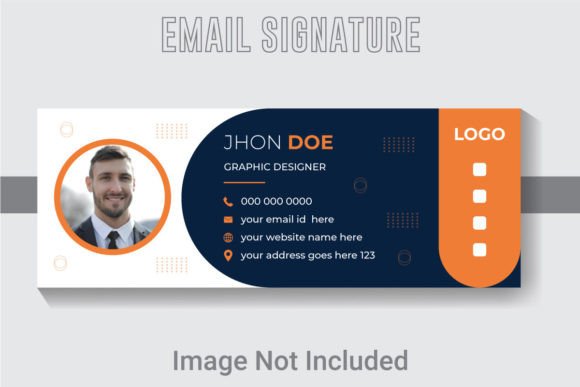
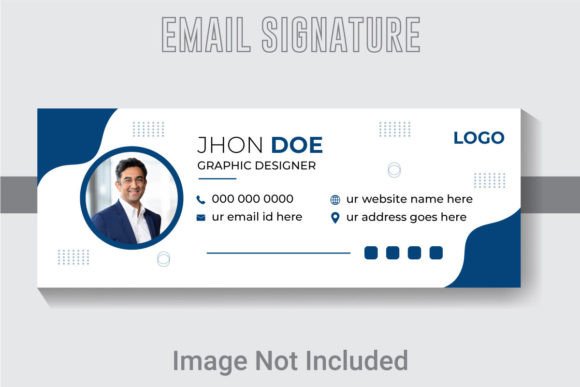
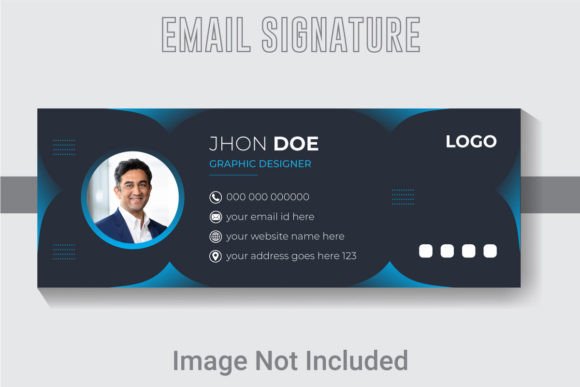
A great signature is a masterclass in balanced design. It must be visually clean, immediately informative, and unmistakably you. The template provided, designed at 851x315 pixels in RGB color at 300 DPI, ensures your signature looks sharp on every screen, from a desktop monitor to a mobile phone. The well-layered and organized AI file is a designer’s dream, allowing for complete customization. You can adjust every font, color, and element to align perfectly with your existing brand identity. This isn’t just about slapping a logo next to your name; it’s about crafting a cohesive visual unit that communicates professionalism at a glance.
Think of the elements at your disposal: your name and title, a direct phone line, your company website, and perhaps a subtle call-to-action. The layout guides the viewer’s eye logically. The typography choices set the tone—whether it’s a modern sans-serif for a tech startup or a classic serif for a law firm. The strategic use of color, drawn from your brand palette, ties everything back to your core visual language. This level of detail, enabled by a premium template, elevates your communication from casual to curated.
Beyond the Inbox: A Versatile Design Asset
While its primary function lives in your email client, the value of this template extends far beyond. The included AI, EPS, and JPG files make it a versatile piece of your design assets library. The same visual language used in your signature can be adapted for other critical touchpoints. Imagine using the same clean layout and typography for your social media profile graphics, creating instant recognition across platforms. The template’s structure can inspire or directly inform the design of your business cards, ensuring a seamless transition from digital to print.
For entrepreneurs and small business owners, this kind of visual consistency is gold. It builds trust and professionalism. The template can serve as a foundation for other marketing assets. Pull the color scheme and font pairings for your next email newsletter design. Use the layout principles for a clean, organized look on your website’s contact page. The well-organized file means you’re not starting from scratch each time; you’re building upon a proven, professional framework, saving hours of design time while strengthening your brand’s presence at every turn.
Practical Design: Making It Work for You
The real power of an editable template is in the customization. Here’s how to approach it practically. First, choose the right font style. The template uses free fonts, which is a huge plus for commercial use. Review the included styles. A clean sans-serif like Open Sans or Montserrat is excellent for readability and a modern feel. If your brand is more traditional, a serif like Lora or Merriweather can add a touch of elegance. The key is to match the typography to your project goals and audience. A creative agency might use a more expressive display font for a name, while a financial consultant would opt for something more subdued and trustworthy.
Next, focus on readability considerations. Keep the text concise. Use hierarchy—perhaps making your name slightly bolder or larger—to guide the viewer. Ensure there is sufficient contrast between text and background colors. Then, test font pairings if you decide to introduce a secondary typeface for a tagline or quote. A common and effective pairing is a serif for headings with a sans-serif for body text. Finally, always check the commercial licensing of any fonts you use, even if the template states they are free. Understanding the license for commercial use protects you and your business down the line.
Building Recognition, One Email at a Time
Ultimately, a Company Email Signature Template is about more than aesthetics; it’s a strategic tool for brand recognition and professional presentation. Every consistent email reinforces who you are and what you represent. It contributes to a cohesive visual identity that makes your business appear established and meticulous. For a content creator or blogger, a well-designed signature can drive traffic to your latest post or social channel. For a marketer, it can subtly promote a current campaign. It’s a small piece of real estate with a significant impact on audience engagement and perception.
In a world where first impressions are increasingly digital, your email signature is prime branding territory. A customizable, high-quality template provides the foundation to execute this with precision and style. It ensures that every sign-off is not just an end, but a strategic, branded interaction that leaves a lasting, positive impression.