The Email Signature Template: Your Brand's Digital Handshake
That little block of text at the bottom of your emails is prime real estate. It’s the last thing someone reads, the digital equivalent of a business card, and often the first impression a new contact gets of your brand’s professionalism. An Email Signature Template isn’t just a place for your name and number; it’s a critical touchpoint for brand identity. A poorly designed signature can feel like an afterthought, while a polished, cohesive one reinforces credibility and keeps your brand top-of-mind. The difference often comes down to design precision and the tools you use to create it.
Beyond the Basics: Crafting a Signature That Works
A functional email signature does more than list contact details. It should guide the reader’s eye, communicate your brand’s personality, and provide clear pathways for engagement. Think about the hierarchy: your name or business name should be most prominent, followed by your title, and then secondary information like phone, website, and social icons. The typography you choose for each line plays a huge role in this hierarchy. A premium font with multiple weights allows you to create subtle yet effective distinctions, using bold for your name and a lighter weight for your tagline, all while maintaining a unified look.
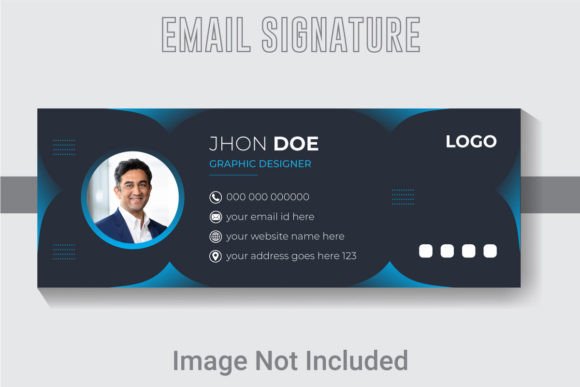
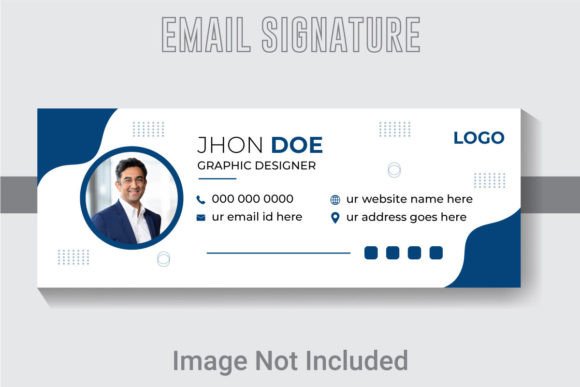
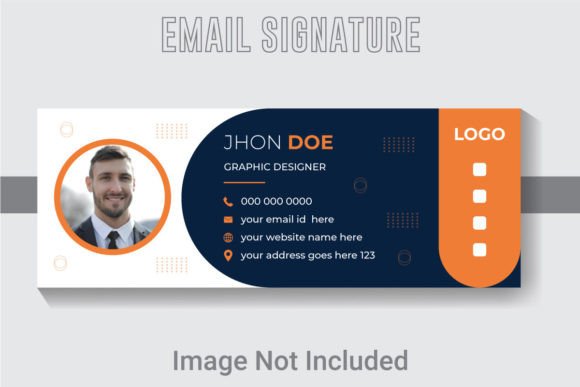
The included Email Signature Template file is built for this level of control. Designed at 851x315 pixels with a 300 DPI resolution, it’s optimized for crisp display on high-resolution screens. The well-layered and organized AI file means every element—from the text and fonts to the color blocks and social media icons—is on its own layer in Adobe Illustrator CS6 or above. This isn’t just a static image; it’s a fully editable design asset. You can adjust the font style, swap the colors to match your brand identity, and rearrange elements to suit your specific needs, whether you’re a freelancer or a growing startup.
The Power of Editable Design in Brand Consistency
One of the biggest challenges in visual communication is maintaining consistency across every single touchpoint. Your website, social media graphics, and email correspondence should all feel like they come from the same source. Using a customizable template for your signature ensures that the typography and color palette you’ve carefully chosen for your logo and marketing materials carry through to your daily communications. This consistency builds brand recognition. When a client sees the same clean sans serif font or distinctive script font in your email that they see on your Instagram feed, it creates a seamless and professional experience.
This template’s editable nature is its greatest strength. The text, fonts, and colors are fully customizable, allowing you to implement your exact brand guidelines. You’re not stuck with a generic design. Instead, you have a flexible foundation that can evolve with your brand. For a small business owner, this means you can create a signature that matches your product packaging design. For a content creator, it can mirror the aesthetic of your blog or YouTube channel graphics. The goal is to use this tool to strengthen your overall brand identity, not just to fill a footer.
Practical Applications for the Modern Professional
The utility of a well-crafted signature extends far beyond basic contact info. It’s a versatile tool for marketing and engagement. Here’s how different professionals can leverage it:
- For Marketers and Entrepreneurs: Use the signature space to promote a current campaign, link to a new blog post, or include a subtle call-to-action. The clean design ensures these elements are noticed without being cluttered.
- For Designers and Agencies: Showcase your attention to detail. A signature that uses a thoughtful font pairing and a harmonious color scheme speaks volumes about your design sensibilities. It’s a portfolio piece in itself.
- For E-commerce and Product-Based Businesses: Incorporate a small product image or a link to your latest collection. The high-resolution design ensures your products look sharp and appealing, driving traffic directly from your correspondence.
- For Freelancers and Consultants: Establish immediate credibility. A professional signature with links to your LinkedIn profile or online portfolio makes it easy for potential clients to learn more about your work and expertise.
The files included—an AI file, an EPS file, and a JPG—provide flexibility for any workflow. The AI and EPS files are perfect for detailed editing in Adobe Illustrator, while the JPG is ready for immediate use or for sharing with team members who may not have design software. This makes it a practical solution for both solo entrepreneurs and collaborative teams.
Choosing and Pairing Fonts for Maximum Impact
The typography within your email signature needs to strike a balance between personality and readability. Since signatures are often viewed on small screens and in various email clients, clarity is paramount. A clean sans serif font is generally a safe and modern choice for body text like your contact details. However, you might choose a more distinctive display font or serif font for your name to add a touch of elegance or authority.
The key is to limit yourself to one or two complementary typefaces. A common and effective strategy is to pair a bold, stylized font for your name with a simple, highly readable font for the rest of the information. This creates a clear visual hierarchy. Always test your chosen fonts in an actual email to see how they render across different devices and clients. What looks perfect in Illustrator might not translate perfectly everywhere. The goal is to find a combination that enhances your message without sacrificing the professional presentation of your communication.
From Template to Tangible Brand Asset
Treating your email signature as a core component of your marketing assets shifts it from a mundane requirement to a strategic tool. It’s a piece of editorial design that you control. By starting with a robust, editable template, you save time and ensure technical quality, allowing you to focus on the creative and strategic elements that make your brand unique.
Remember to consider the full context of your brand’s visual language. The colors in your signature should be pulled from your primary brand palette. The style of any icons should match those used on your website or in your social media graphics. When all these elements work in concert, you create a cohesive experience that builds trust and strengthens audience engagement. This Email Signature Template provides the structured, high-quality canvas you need to make every email you send a deliberate and polished extension of your brand.