Suleva: A Google Slides Template for Polished Business Presentations
You’ve got the data, the strategy, and the vision. But when it’s time to present it to clients, investors, or your team, the slide deck often becomes an afterthought—a cluttered collection of bullet points and mismatched clip art. A powerful message deserves a powerful vessel. That’s where a thoughtfully designed template transforms your content from information into impact. The Suleva - Google Slide Template is built for this exact purpose, offering a clean, scalable, and multipurpose foundation that lets your ideas shine without the design hassle.
Beyond Bullet Points: Crafting a Visual Narrative
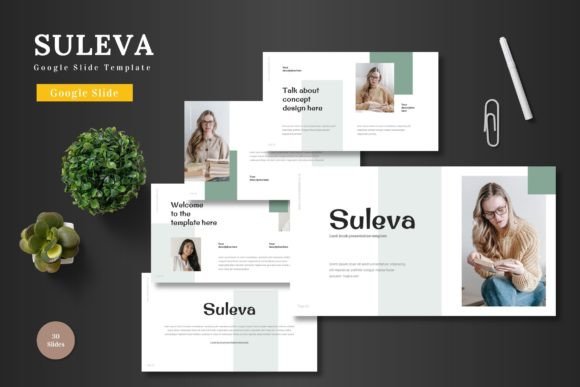
Effective presentations are stories, not reports. They guide an audience through a logical journey with visual cues that reinforce key messages. Suleva understands this narrative need. With over 150 total slides across five premade color schemes, you have a versatile toolkit to structure your story. The inclusion of section break slides is particularly valuable, allowing you to pause and pivot between major themes—like moving from market analysis to product demos—without losing your audience. Each of the 30 slides per template is crafted with pixel-perfect illustrations and handcrafted infographics, turning complex data into digestible, memorable visuals.
The real power lies in its seamless integration with Google Slides. Every element is editable directly within the platform you already use. There’s no need to switch between complicated design software. You can drag and drop images into placeholders, adjust colors to match your brand palette in seconds, and even animate slides to control the pacing of your delivery. This isn’t just a template; it’s a dynamic presentation system that maintains visual consistency from the first slide to the last.
Practical Applications for Growing Businesses and Creatives
Think of a template like this as a central hub for your visual communication. Its utility extends far beyond a single quarterly meeting. For the small business owner, it’s the foundation for a cohesive brand identity. Use the same template’s color scheme and layout principles to design your investor pitch, your internal team update, and your product launch webinar. This consistency builds recognition and projects a level of professionalism that builds trust.
For marketers and content creators, Suleva is a launchpad for marketing assets. The gallery and portfolio slides are perfect for showcasing client work, case studies, or product collections. The clean infographic layouts can be repurposed for social media graphics or blog headers, ensuring your visual language is unified across platforms. Imagine presenting a new campaign to stakeholders using this deck, then using the same style elements to create the actual social media posts—your workflow becomes infinitely more efficient.
Matching the Tool to the Task: Choosing Your Style
Not every project calls for the same visual tone, which is why the five color variations are a critical feature. A bold, high-contrast scheme might be ideal for a tech startup’s pitch deck, while a softer, more muted palette could be perfect for a wellness brand’s client proposal. The key is to select the variation that best aligns with your project’s goals and your audience’s expectations. A financial services firm will want to convey stability and trust (perhaps with blues and greys), while a creative agency might opt for vibrant, energetic colors to showcase innovation.
Before committing to a template for a major project, take time to test it. Input a sample of your actual content—your most complex slide, your most image-heavy page. See how the typography handles your text. Check that the placeholder frames work with your existing image library. This hands-on test is more valuable than any feature list. Does the template feel like a natural extension of your brand, or does it fight against it? The right template should feel like a collaborator, not a constraint.
Streamlining Workflow and Ensuring Quality
One of the most significant advantages of a system like Suleva - Google Slide Template is the time it saves. Designing a polished, 30-slide presentation from scratch is a substantial undertaking. This template provides a professional scaffold, allowing you to focus on refining your message and rehearsing your delivery rather than agonizing over alignment and font pairings. The master slide functionality means that global changes—like updating a company logo or tweaking a primary color—can be made once and applied everywhere, safeguarding your visual consistency.
The package includes practical resources like a readme file detailing fonts and photo information. This is crucial for maintaining brand integrity. Knowing the exact typefaces used allows you to replicate the look in other design assets, from your website to printed brochures. Always review the commercial licensing for any included fonts, especially if you plan to use the final presentation in public-facing marketing or for a client. Ensuring you have the proper rights is a fundamental part of professional design practice.
Elevating Your Professional Presence
In a crowded digital landscape, the quality of your visual communication is a direct reflection of the quality of your work. A well-organized, aesthetically pleasing presentation does more than convey information; it builds credibility. It shows your audience that you value their time and attention. It demonstrates that you care about the details, which translates to confidence in your overall offering.
Whether you’re a startup founder courting venture capital, a consultant presenting findings to a client, or a teacher creating engaging educational materials, the framework you use matters. A versatile, editable, and professionally designed template like Suleva removes the technical barriers to creating stunning visuals. It empowers you to present your ideas with clarity and style, ensuring your message isn’t just heard, but remembered. The next time you prepare for a big presentation, start with a foundation that’s built to impress.