Trimuca: A Keynote Template for Cohesive Visual Storytelling
Ever sat through a presentation that felt disjointed, where each slide seemed to belong to a different deck? Or perhaps you've been the one wrestling with formatting, trying to make disparate elements look like they belong together? The struggle for visual consistency is real, especially when you're trying to convey a professional, polished message. This is where a thoughtfully designed Keynote template moves from being a nice-to-have to an essential tool in your creative arsenal.
More Than Just Slides: A System for Visual Harmony
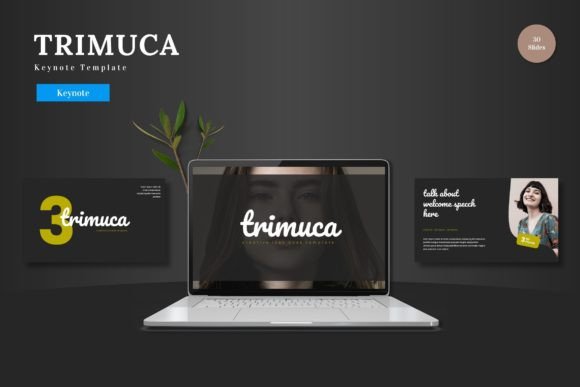
Trimuca - Keynote Template isn't just a collection of pretty slides. It's a comprehensive design system built on the principle of cohesion. With over 150 total slides across five premade color schemes, it provides a structured yet flexible foundation for any presentation. The magic lies in its master slide architecture. Every layout, from the bold section breaks to the detailed infographics, is crafted to work together seamlessly. This means you're not starting from scratch with each new slide; you're building within a unified visual language. The pixel-perfect illustrations and resizable graphics ensure that every element looks sharp, whether you're presenting on a small laptop screen or a large conference room display.
This level of design integrity is crucial for anyone serious about their brand identity. Whether you're a startup founder pitching to investors, a marketer launching a new campaign, or a creative professional showcasing a portfolio, your presentation is often the first deep-dive interaction someone has with your brand. Trimuca helps ensure that interaction is professional, memorable, and on-brand.
Practical Applications Beyond the Boardroom
While the primary function is clear, the value of a template like Trimuca extends far into other areas of creative work. The consistent visual style it provides is a goldmine for maintaining brand recognition across multiple touchpoints.
Consider these practical uses:
- Social Media Graphics: Use the cohesive color palettes and graphic styles to create a series of Instagram stories or LinkedIn carousels that feel connected. The handcrafted infographics can be repurposed into standalone, shareable content.
- Digital Products & Marketing Assets: Design beautiful PDF guides, worksheets, or email opt-in offers. The clean layouts and professional typography ensure your digital products look as valuable as the content inside them.
- Editorial Layouts & Proposals: Create client proposals, project briefs, or even simple editorial spreads for a blog or magazine. The structured grids and section breaks help organize complex information into digestible, visually appealing pages.
- Branding & Packaging Mockups: Use the slides as a backdrop for mockup presentations. Place your logo designs, packaging concepts, or product shots into the picture placeholders to show them in context, telling a cohesive brand story from concept to execution.
The drag-and-drop picture placeholder feature is particularly useful here. It turns the template into a dynamic canvas for your own visual assets, allowing you to maintain the template's professional aesthetic while injecting your unique content.
Designing with Purpose: Typography and Readability
A key component of Trimuca's effectiveness is its thoughtful approach to modern typography. The included font pairings are chosen not just for style, but for function. In presentation design, readability is non-negotiable. Your audience needs to grasp your message quickly, from the back of the room or on a recorded webinar. The clean sans serif options likely used for body text ensure clarity, while a more distinctive display font for headlines adds personality without sacrificing legibility.
When customizing, keep these principles in mind:
- Match Font to Tone: Is your presentation serious and corporate, or creative and energetic? Stick to the template's suggested font styles, or choose your own premium font that aligns with your brand's voice. A script font might work for a wedding planner's portfolio but could be distracting in a financial report.
- Test Your Pairings: If you decide to swap out fonts, test your new pairing on a few key slides. Check for contrast in weight and style, and ensure they don't compete for attention.
- Embrace Hierarchy: Use the template's built-in text styles. The hierarchy between a bold h1, a supporting h2, and body text guides the viewer's eye naturally through your narrative.
Streamlining Your Creative Workflow
For small business owners and content creators, time is a precious commodity. Trimuca is designed to streamline the design process, not complicate it. The five color variations provide instant mood shifts—go from a professional blue palette to a vibrant, energetic scheme in a click. The 30 slides per template offer enough variety for a full-length presentation without overwhelming you with choices.
Think of it as a toolkit for visual communication. The section break slides act as chapter markers, helping you structure your story logically. The gallery and portfolio slides are perfect for showcasing work in a clean, distraction-free format. This efficiency allows you to focus on your core message and strategy, rather than getting bogged down in pixel-pushing.
Before finalizing your deck, always do a quick review. Check that all placeholder images have been replaced with your own content. Ensure your custom color choices maintain sufficient contrast for accessibility. And most importantly, present it to a colleague or friend to see if the flow and visuals land as intended.
In the end, a great presentation does more than share information; it creates an experience. By providing a foundation of visual consistency, professional design, and adaptable structure, a template like Trimuca empowers you to deliver that experience with confidence, ensuring your ideas are not just heard, but remembered.