Accentris Google Slides: A Deep Dive into This 150+ Slide Template
Creating a presentation that feels both professional and uniquely yours can be a time-consuming challenge. You need a structure that works, designs that impress, and the flexibility to adapt everything to your specific brand or message. This is where a well-crafted template becomes an invaluable asset, saving hours of design work while ensuring a polished, cohesive result. If you're searching for a solution that balances aesthetic appeal with practical functionality, the Accentris Google Slides Template is designed to meet that need.
More Than Just Slides: A Visual Toolkit for Modern Projects
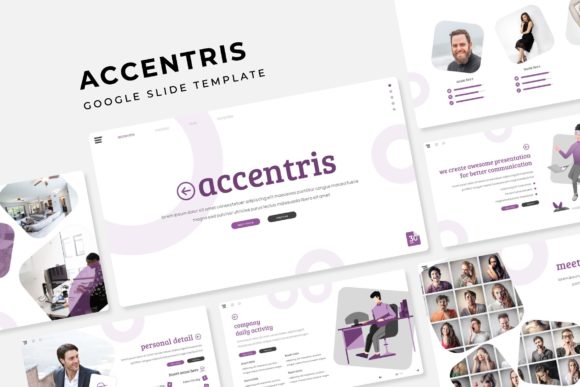
At its core, the Accentris template is a comprehensive presentation kit. It includes 150+ total slides, organized into five distinct color variations. Each color scheme offers 30 meticulously designed slides, giving you a substantial starting point for any project. This structure is particularly helpful for maintaining visual consistency across different sections of a long presentation or for creating a series of related decks that all share the same design DNA. The variety ensures you won't run out of layouts for your content, from detailed data breakdowns to clean portfolio showcases.
Beyond the sheer number of slides, the attention to detail is what sets this apart. The package includes handcrafted infographics, which are essential for transforming complex information into engaging visual stories. Instead of relying on generic chart templates, you get purpose-built designs that can help clarify processes, timelines, comparisons, and key metrics. Section break slides are also included, providing a natural pause in your narrative and helping to organize your presentation into digestible chapters. For creative professionals, the gallery and portfolio slides are a standout feature, offering elegant ways to display work, case studies, or product imagery without having to build layouts from scratch.
Practical Design for Real-World Use
A beautiful template is useless if it's difficult to customize. This is where the practical design of Accentris truly shines. Built on a system of master slides, every element is designed for efficiency. You can change the color scheme, update fonts, or adjust layouts from one central place, and those changes will cascade throughout the entire presentation. This master slide approach is a hallmark of professional design assets, ensuring that your final product is pixel-perfect and aligned.
The template also prioritizes ease of use with features like resizable and editable graphics and picture placeholders. Need to swap out an image? Simply drag and drop your photo into the designated placeholder, and it will automatically crop and fit the space perfectly. This eliminates the tedious resizing and repositioning that often bogs down the presentation-building process. The graphics themselves are fully editable vectors, meaning you can change colors, sizes, and even individual shapes to match your brand identity precisely. This level of control is crucial for creating a presentation that feels truly custom, not just filled with a pre-made template.
Who Stands to Benefit Most from This Template?
The versatility of the Accentris template makes it a valuable resource for a wide range of professionals and creators. For marketers and brand strategists, it's a tool for building client pitches, campaign reports, and brand guidelines that need to look impeccable. The consistent design language across the slides helps reinforce brand recognition and professionalism.
Small business owners and entrepreneurs will find it ideal for investor decks, product launch presentations, and team training materials. The time saved on design can be redirected to refining the business message itself. Content creators and bloggers can use the portfolio and gallery slides to create compelling media kits or visual guides for their audiences. The clean, modern typography included in the template enhances readability, ensuring your message is communicated clearly whether it's viewed on a large screen or a laptop.
Even for designers and creative agencies, having a robust template like this in your toolkit can streamline internal workflows. It can serve as a foundation for client projects, allowing you to focus on strategic content and high-level design tweaks rather than building every slide from the ground up. The inclusion of a "Readme First" document and links to the free fonts used demonstrates a thoughtful approach to the user experience, helping you get started quickly without font licensing headaches.
Maximizing Your Investment: Tips for Effective Use
To get the most out of the Accentris Google Slides Template, start by defining your project's goal. Is it to educate, persuade, or inform? Let that objective guide your slide selection. Don't feel obligated to use all 150+ slides; instead, curate the ones that best serve your narrative. The five color schemes are a fantastic resource for different projects or for aligning with specific client branding guidelines. You might use the blue palette for a corporate financial review and switch to a warmer, more energetic palette for a creative workshop.
Pay close attention to the included infographics and data visualization slides. Before you start inputting data, sketch out the story you want your numbers to tell. The handcrafted designs in Accentris are built to support that storytelling, so use them to highlight trends, show comparisons, or illustrate a process flow. Remember that the strength of a presentation often lies in its clarity, and these visual aids are your allies in achieving that.
Finally, while the template provides a professional backbone, your unique content is what will make it resonate. Use the clean layouts and ample white space to let your key points breathe. The professional presentation design is there to elevate your message, not overshadow it. By combining the structural integrity and aesthetic polish of the Accentris template with your own compelling content and strategic thinking, you can create presentations that are not only visually stunning but also deeply effective in achieving your communication goals. This asset is designed to be a versatile partner in your visual communication strategy, helping you present your ideas with confidence and style.